
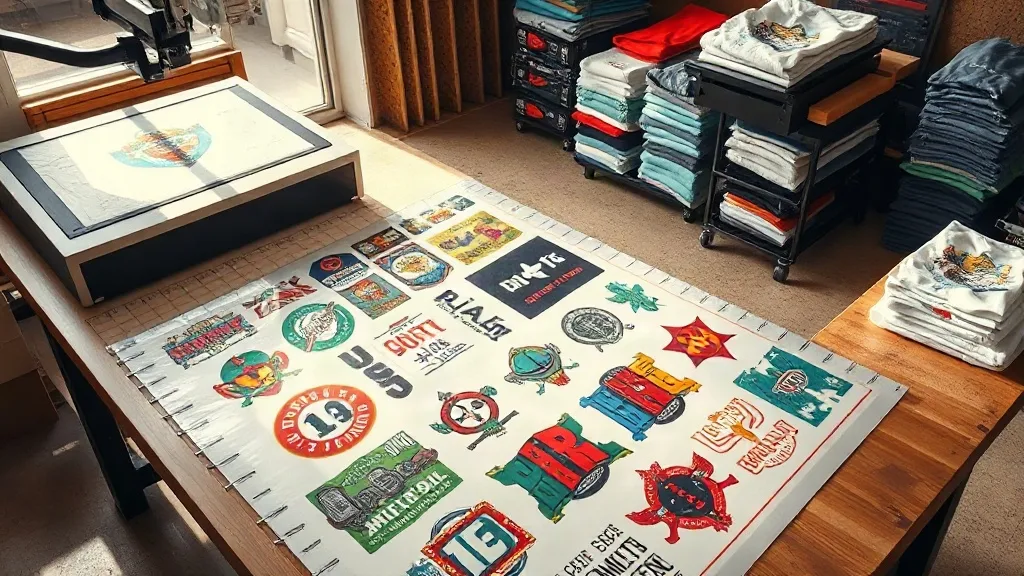
In the competitive world of custom apparel, efficiency and cost control are paramount. Whether you're a small print shop or a growing brand, the DTF Gangsheet has emerged as a game-changer, allowing you to print multiple designs in a single pass, minimizing waste and maximizing productivity. This guide dives deep into the art and science of gangsheet printing, offering practical insights to help you streamline your workflow and boost your bottom line.
What Is a DTF Gangsheet?
A DTF (Direct-to-Film) gangsheet is a layout that combines multiple designs onto a single sheet of DTF film. Instead of printing each design individually, you arrange them efficiently to fill the available space, then print them all at once. This approach is akin to gang printing in offset lithography, where multiple jobs are combined to save time and materials. In DTF, the gangsheet method is particularly beneficial for small to medium-sized orders that would otherwise waste film and powder if printed separately.
Why Use a DTF Gangsheet?
The primary advantages of gangsheets are cost savings and increased throughput. By maximizing the use of each sheet, you reduce film waste, adhesive powder consumption, and overall production time. For example, if you have several orders for different customers, you can nest them together on one sheet, print them in one go, and then cut them apart for pressing. This is especially useful for print-on-demand businesses that handle many small orders daily.
Designing for Gangsheets: Key Considerations
Creating an effective gangsheet requires careful planning. Not all designs can be arbitrarily placed; you need to consider ink coverage, color complexity, and the physical dimensions of each design. Here are some best practices:
- Group similar colors: If you have designs with similar color palettes, place them together to reduce ink changes and improve color consistency.
- Optimize spacing: Leave enough space between designs for cutting and handling, but avoid excessive gaps that waste film.
- Consider the grain: DTF film has a grain direction; align designs accordingly to ensure proper adhesion and stretch.
- Use nesting software: Invest in software that automatically arranges designs to minimize waste. Many RIP software packages offer gangsheet nesting features.
Step-by-Step: Creating a DTF Gangsheet
Follow these steps to create and use a gangsheet efficiently:
- Collect and organize designs: Gather all the designs you want to include. Ensure they are properly sized and have transparent backgrounds.
- Set up the sheet size: Determine the dimensions of your DTF film roll. Common widths are 13", 17", and 24". Choose a length that accommodates your designs without excessive waste.
- Arrange designs: Use your RIP software to import designs and arrange them on the sheet. Aim for a balance between tight nesting and sufficient spacing for cutting.
- Print and powder: Print the gangsheet on DTF film, then apply adhesive powder evenly. Cure the powder according to your equipment's specifications.
- Cut and press: Cut out each design and press it onto the garment using a heat press. Follow the recommended temperature, pressure, and time for your transfer.
Maximizing Efficiency with Gangsheets
To truly reap the benefits, integrate gangsheets into your production workflow. Batch similar orders together, and schedule printing sessions that combine multiple jobs. This reduces setup time and allows you to take advantage of economies of scale. Additionally, consider using a DTF Gangsheet service if you lack in-house printing capabilities; many providers offer gangsheet printing at competitive rates, giving you access to professional quality without the capital investment.
Common Pitfalls and How to Avoid Them
Even experienced printers encounter issues with gangsheets. Here are some common pitfalls and solutions:
- Insufficient spacing: Designs placed too close together can bleed into each other during printing or make cutting difficult. Always leave at least 0.25 inches between designs.
- Inconsistent powder application: Uneven powder can cause patchy adhesion. Use a powder shaker or automated powder applicator for even coverage.
- Color shifting: When printing multiple designs with different color profiles, colors may shift. Calibrate your printer regularly and use consistent color settings.
- Film curling: DTF film can curl at the edges, causing jams. Store film in a cool, dry place and ensure proper tension during printing.
Cost Analysis: Is a Gangsheet Worth It?
For many shops, the answer is a resounding yes. Let's break down the costs. A single DTF transfer can cost between $1 and $3 in materials (film, ink, powder) depending on size and coverage. If you print one design per sheet, you might use a 13x19 sheet that costs $2, resulting in a cost of $2 per design. However, if you can fit four designs on that same sheet, your material cost per design drops to $0.50. Add savings in time and labor, and the ROI becomes clear. Of course, this assumes you have enough designs to fill the sheet; if not, consider combining orders or using a gangsheet service.
Choosing the Right DTF Gangsheet Service
If you decide to outsource, look for a provider that offers high-quality prints, fast turnaround, and competitive pricing. Check for reviews and ask for samples. A good service will provide you with a template to arrange your designs, ensuring proper spacing and orientation. They should also offer a variety of film sizes and the option to add or remove designs as needed. Remember, the goal is to make your production process smoother, so choose a partner that aligns with your quality standards and deadlines.
Frequently Asked Questions
What is the maximum size for a DTF gangsheet?
The maximum size depends on your printer and film roll. Common widths are 13", 17", and 24", with lengths limited by the roll. Some industrial printers can handle widths up to 60". Always check your equipment's specifications.
Can I mix different fabric types on one gangsheet?
Yes, you can print designs intended for different fabrics on the same gangsheet, as long as the pressing parameters are compatible. However, if a design requires a different pressing temperature or time, it's best to separate them to avoid under- or over-curing.
How do I ensure accurate color reproduction across a gangsheet?
Use a consistent color profile for all designs, and calibrate your printer regularly. Also, group designs with similar color palettes together to minimize color shifts during printing.
What's the best way to cut a gangsheet?
Use a sharp pair of scissors or a rotary cutter for small quantities. For larger volumes, consider a vinyl cutter or a guillotine trimmer. Always cut slightly outside the design edge to avoid cutting into the print.
Can I reuse a gangsheet?
No, DTF gangsheets are single-use. Once the designs are cut out and pressed, the remaining film cannot be reused.
By mastering the DTF gangsheet, you unlock a new level of efficiency and profitability in your custom apparel business. Whether you print in-house or outsource, the principles of smart layout and batching remain the same. Start experimenting with gangsheets today and watch your production costs drop while your output soars.